Open Duck Mini v2 बनाना: प्रिंट से पहली चाल तक

यह मानक Open Duck Mini v2 का निर्माण मार्ग है। पैक में 36 मूल STL और 51 प्रिंटेड पुर्जे हैं: 49 PLA तथा 2 TPU; यह MicroDuck XL330 या HD1910 का प्रिंट पैक नहीं है।

हिंदी संस्करण 31 अक्टूबर 2026 को प्रकाशित। नीचे मूल सामग्री की तारीख अलग है; पुरानी रिलीज को नई घोषणा न मानें। मूल संशोधन:

36 STL · 51 · PLA49 / TPU2

PLA 15%; foot_bottom_tpu.stl में TPU 40%। पहले पैर/जोड़ का fit test,layer/support/temperature स्वयं स्रोत से जांचें।

36 STL · 51 · PLA49 / TPU2
मूल STL फाइलमात्राmaterial / infill
foot_top.stl2PLA / 15%
foot_side.stl2PLA / 15%
foot_bottom_pla.stl2PLA / 15%
foot_bottom_tpu.stl2TPU / 40%
knee_to_ankle_left_sheet.stl4PLA / 15%
knee_to_ankle_right_sheet.stl4PLA / 15%
leg_spacer.stl4PLA / 15%
left_roll_to_pitch.stl1PLA / 15%
right_roll_to_pitch.stl1PLA / 15%
roll_motor_bottom.stl2PLA / 15%
roll_motor_top.stl2PLA / 15%
trunk_bottom.stl1PLA / 15%
trunk_top.stl1PLA / 15%
neck_left_sheet.stl1PLA / 15%
neck_right_sheet.stl1PLA / 15%
head_pitch_to_yaw.stl1PLA / 15%
head_yaw_to_roll.stl1PLA / 15%
head_roll_mount.stl1PLA / 15%
head.stl1PLA / 15%
head_bot_sheet.stl1PLA / 15%
left_antenna_holder.stl1PLA / 15%
right_antenna_holder.stl1PLA / 15%
left_cache.stl1PLA / 15%
right_cache.stl1PLA / 15%
body_front.stl1PLA / 15%
body_middle_bottom.stl1PLA / 15%
body_middle_top.stl1PLA / 15%
body_back.stl1PLA / 15%
battery_pack_lid.stl1PLA / 15%
bulb.stl1PLA / 15%
flash_light_module.stl1PLA / 15%
flash_reflector_interface.stl1PLA / 15%
left_eye.stl1PLA / 15%
right_eye.stl1PLA / 15%
speaker_interface.stl1PLA / 15%
speaker_stand.stl1PLA / 15%

1–2: BOM और प्रिंट

मूल BOM के साथ 7.4 V STS3215, controller, IMU और bus adapter मिलाएं। मूल निर्देश PLA 15% infill और foot_bottom_tpu.stl के लिए TPU 40% बताते हैं। layer height, support और तापमान की सार्वभौम preset नहीं दी गई; पहले पैर और संरचनात्मक जोड़ का फिट नमूना बनाएं।

3–4: ID और असेंबली

हर सर्वो को अलग जोड़कर मूल ID तालिका लागू करें और label लगाएं। power बंद रखकर neutral alignment, बायां/दायां भाग और screw depth जांचें। लेखक के मूल चित्रों से हर जोड़ मिलाएं।

5–6: wiring और सिस्टम

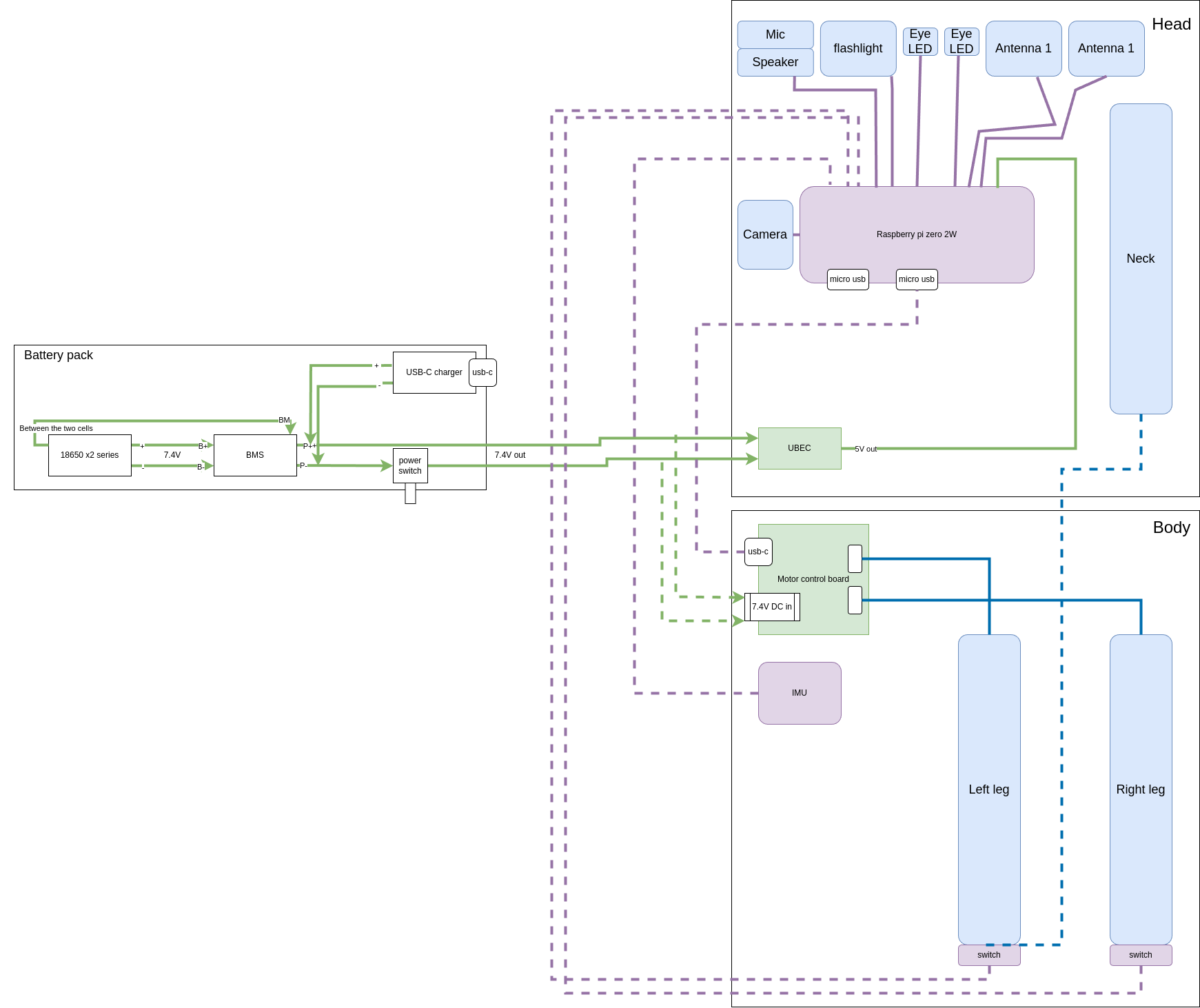
निर्दिष्ट wiring diagram से polarity, GND और bus chain जांचें। Pi को अलग regulated 5 V दें, battery rail सीधे 5 V pin में न लगाएं। केवल इसी परियोजना का runtime और fixed revision स्थापित करें; पहले serial और sensor जांचें।

7–8: calibration और पहली चाल

उसी runtime की calibration प्रक्रिया से joint zeros और IMU orientation जांचें। समर्थन के साथ छोटा test करें, पहले रुकना सीखें और unexpected movement पर आगे न बढ़ें। नीचे पूरी मूल फाइल सूची, wiring diagrams और offline guide हैं; साइट ने वास्तविक प्रिंट/फिट/चाल नहीं जांची है।

स्रोत के संस्करण से संबंधित कमांड

python scripts/configure_motor.py --help
python scripts/configure_motor.py --port /dev/ttyACM0 --id 20
git clone https://github.com/apirrone/Open_Duck_Mini_Runtime Open_Duck_Mini_Runtime-reviewed
cd Open_Duck_Mini_Runtime-reviewed
git checkout --detach 376de65435c93486347cd601a31aa96951799896
python v2_rl_walk_mujoco.py --onnx_model_path /absolute/path/BEST_WALK_ONNX_2.onnx

मूल wiring diagram

मूल wiring diagram · Open Duck Mini v2
Antoine Pirrone · Open Duck Mini v2 · Apache 2.0. Pi का अलग regulated 5 V; battery rail सीधे Pi 5 V pin में नहीं।

मूल wiring diagram ↗ ↗

स्रोत और जाँच की तारीख

स्रोत का संस्करण 9 सितंबर 2026 · स्रोत की जाँच हुई

  1. मूल स्रोत 1 · github.com / README.md ↗
  2. मूल स्रोत 2 · docs.google.com / edit ↗
  3. मूल स्रोत 3 · tnkr.ai / open-duck-mini-v2 ↗
  4. मूल स्रोत 4 · github.com / print_guide.md ↗
  5. मूल स्रोत 5 · github.com / configure_motors.md ↗
  6. मूल स्रोत 6 · github.com / configure_motor.py ↗
  7. मूल स्रोत 7 · github.com / assembly_guide.md ↗
  8. मूल स्रोत 8 · github.com / README.md ↗
  9. मूल स्रोत 9 · github.com / INSTALL.md ↗
  10. मूल स्रोत 10 · github.com / releases ↗
  11. मूल स्रोत 11 · github.com / example_config.json ↗
  12. मूल स्रोत 12 · github.com / check_motors.py ↗
  13. मूल स्रोत 13 · github.com / checklist.md ↗
  14. मूल स्रोत 14 · github.com / v2_rl_walk_mujoco.py ↗
  15. मूल स्रोत 15 · github.com / sim2real.md ↗